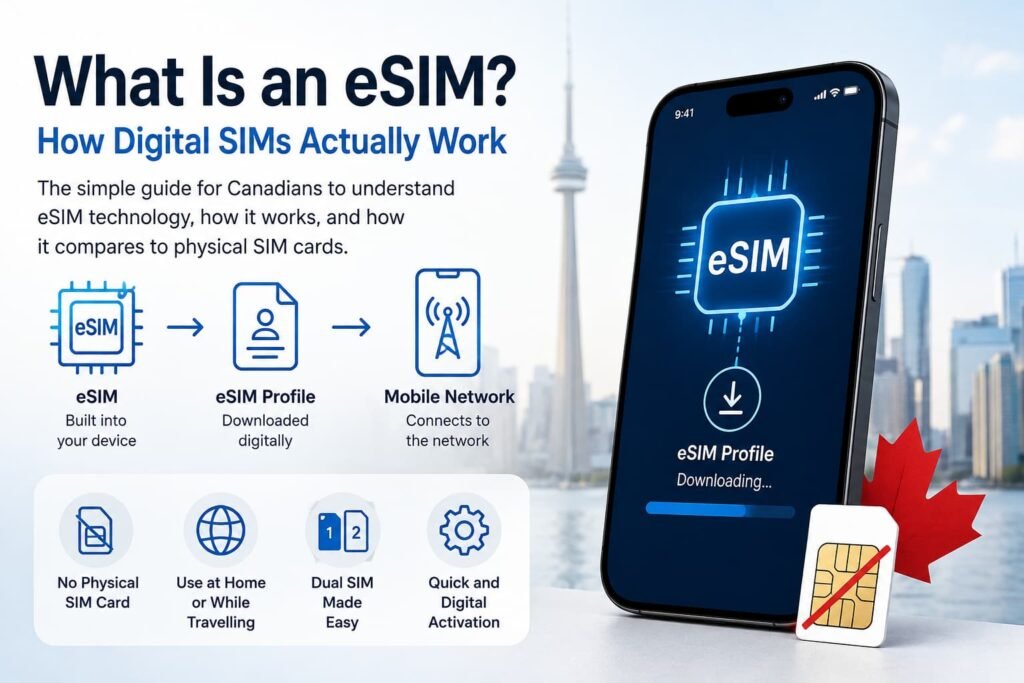
An eSIM is a digital way of connecting your phone to a mobile carrier without inserting a removable SIM card. The technology is built into a compatible device, and your carrier or eSIM provider downloads a mobile profile to it instead.
That sounds simple, but the way eSIM is marketed can make it more confusing than it needs to be. You may hear the term when activating a regular Rogers, Bell or TELUS line, adding a second number to your phone, or buying mobile data for a trip. All of those can use eSIM technology, but they are not the same type of mobile service.
Understanding that distinction makes everything else much easier.
An eSIM changes how your mobile subscription is stored and activated. It does not automatically determine your carrier, phone number, data allowance, speed, coverage or whether your plan includes calls and texts.
What Is an eSIM and How Does It Work?
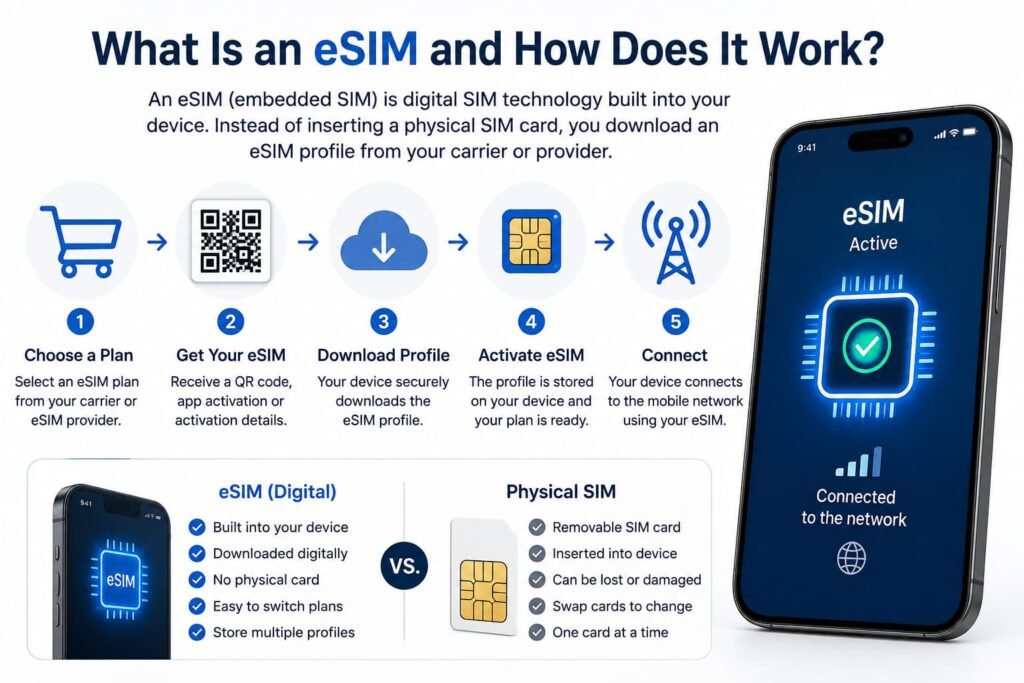
An eSIM, short for embedded SIM, is a programmable SIM built into a compatible phone or other cellular device. SIM stands for Subscriber Identity Module. Instead of inserting a removable plastic SIM card, you download an eSIM profile supplied by your carrier or eSIM provider.
That profile contains the information your phone needs to identify your mobile subscription and connect to the appropriate cellular network. The eSIM itself is the built-in technology, while the downloaded profile and the mobile plan attached to it are separate parts of the service.
In practical terms, an eSIM lets you activate mobile service digitally. You can use the same technology for your regular Canadian phone line, a second personal or work number, or a travel eSIM for mobile data abroad.
How Does an eSIM Work?
A traditional SIM card contains information that allows a mobile network to recognize your subscription. An eSIM performs the same basic job, but instead of inserting a removable card, the SIM functionality is already built into a compatible device.
When you activate an eSIM, your carrier or provider securely supplies a digital profile. Your phone downloads that profile and stores it on its built-in eSIM.
From that point, the phone can use the profile to connect to the mobile network associated with your plan.
A simple way to picture the process is:
Mobile carrier or eSIM provider → eSIM profile → your phone → cellular network
The GSMA develops the industry specifications used for eSIM and remote SIM provisioning. That standardization is what allows compatible devices and mobile operators to activate subscriptions digitally instead of relying entirely on removable SIM cards.
For most users, you do not need to understand the technical provisioning system behind it. The important part is that your cellular subscription can be installed electronically.
eSIM Hardware, eSIM Profiles and Mobile Plans Are Not the Same Thing
This is where a lot of eSIM explanations become unnecessarily confusing.
The eSIM, the eSIM profile and the mobile plan are three related but different things.
| Term | What It Is | Simple Explanation |
|---|---|---|
| eSIM | Programmable SIM technology built into the device | The part of your phone that can securely store digital SIM profiles |
| eSIM profile | Digital carrier information installed on the eSIM | Tells your phone which mobile subscription it can use |
| Mobile plan | The actual cellular service you purchased | Determines your data, calls, texts, number, validity and other service features |
This distinction matters because people often use the word “eSIM” to describe all three.
For example, when you buy a travel eSIM for France, you are really buying a travel mobile plan that is delivered to your phone as an eSIM profile. The built-in eSIM technology was already in your phone before you bought the plan.
The same technology can also hold your regular Canadian mobile subscription.
That means a Rogers eSIM, a travel eSIM and a second work number can all use the same underlying technology even though the plans themselves are very different.
eSIM vs Physical SIM Card: What Actually Changes?
An eSIM and a physical SIM perform the same fundamental job: they identify your mobile subscription to a cellular network.
The biggest difference is how that information gets onto your device.
| Feature | eSIM | Physical SIM Card |
|---|---|---|
| Form | Built into the device | Removable plastic card |
| Installation | Digital profile is downloaded | SIM card is inserted into a tray |
| Changing plans | Often handled through settings, an app, carrier activation or QR code | Usually requires inserting or replacing a card |
| Multiple profiles | Supported on many compatible devices | Normally one subscription per physical card |
| Physical card to lose | No | Yes |
| Moving to another phone | May require transfer or reactivation | Often as simple as moving the SIM card |
| Device support | Requires an eSIM-compatible model | Supported by devices with a compatible SIM tray |
| Network performance | Determined mainly by carrier, plan, device and location | Determined mainly by carrier, plan, device and location |
For day-to-day use, you may notice very little difference once the line is active.
Calls still come through your phone. Mobile data still uses a cellular network. Text messages still work if your plan includes them. Your phone number can remain the same when your carrier moves an existing line from a physical SIM to an eSIM.
The main change happens behind the scenes and during setup.
What Can You Use an eSIM For?
An eSIM is not limited to international travel.
Your Regular Canadian Mobile Line
Canadian carriers can use eSIM for ordinary cellular service. Instead of keeping your main line on a physical SIM, an eligible carrier can activate the subscription digitally on a compatible phone.
If you are researching Canadian carriers, setup options and device support rather than the underlying technology, our eSIM Canada guide goes much deeper into that side of the decision.
A Second Personal or Work Line
Dual SIM phones can make it possible to keep two lines available on one device.
Someone might use one number for personal calls and another for work, or maintain subscriptions with two different carriers.
Exactly how many profiles can be stored or active at once depends on the device.
Travel Data
Travel is one of the reasons eSIM has become so visible.
Instead of removing your Canadian SIM and buying a physical SIM after arrival, you can often purchase a prepaid travel plan online and install its eSIM profile before leaving Canada.
You can then use the travel line for mobile data while keeping your Canadian line on the phone.
If this is why you are learning about eSIM, see our Best eSIM for International Travel guide for provider and plan comparisons.
Tablets, Smartwatches and Other Cellular Devices
eSIM is also used in some cellular tablets, watches and other connected devices.
The device still needs the appropriate cellular hardware and carrier support. A Wi-Fi-only tablet, for example, cannot become a cellular device simply by downloading an eSIM.
Carrier eSIM vs Travel eSIM
A carrier eSIM and a travel eSIM use the same underlying idea, but the service attached to them can be very different.
A regular Canadian carrier eSIM might include:
- your Canadian phone number;
- domestic mobile data;
- conventional calls and SMS;
- voicemail;
- carrier roaming;
- your regular monthly mobile plan.
A travel eSIM is usually designed for temporary use in another country or region. Many travel plans focus primarily on prepaid mobile data.
Some include calls, texts or a phone number, but many do not.
That is a plan limitation, not an eSIM limitation.
The eSIM technology itself is capable of supporting regular phone service. What you actually receive depends on the provider and the plan you purchase.
This is why it is worth checking the details before assuming every travel eSIM works like your Canadian mobile line.
Can You Use Two SIMs at the Same Time?
Many modern phones support some form of Dual SIM, which means two mobile subscriptions can be available on the same phone.
Depending on the device, that might mean:
- one physical SIM plus one eSIM;
- two active eSIMs;
- multiple stored eSIM profiles with only selected profiles active.
The exact combination depends on the phone model and region.
For Canadians travelling abroad, one particularly useful setup is to keep the Canadian line available while using a travel eSIM for data.
For example:
Canadian line: calls, texts, verification codes and your regular number
Travel eSIM: maps, messaging apps, email, browsing and other mobile data
That can give you more flexibility than removing your Canadian SIM completely.
You still need to configure the lines carefully. Keeping a Canadian line active does not automatically make roaming free. Calls, outgoing texts, voicemail activity or accidental mobile-data use may still trigger carrier charges depending on your plan.
If you are trying to decide between your Canadian carrier and prepaid travel data, our Travel eSIM vs International Roaming for Canadians guide covers that decision in more detail.
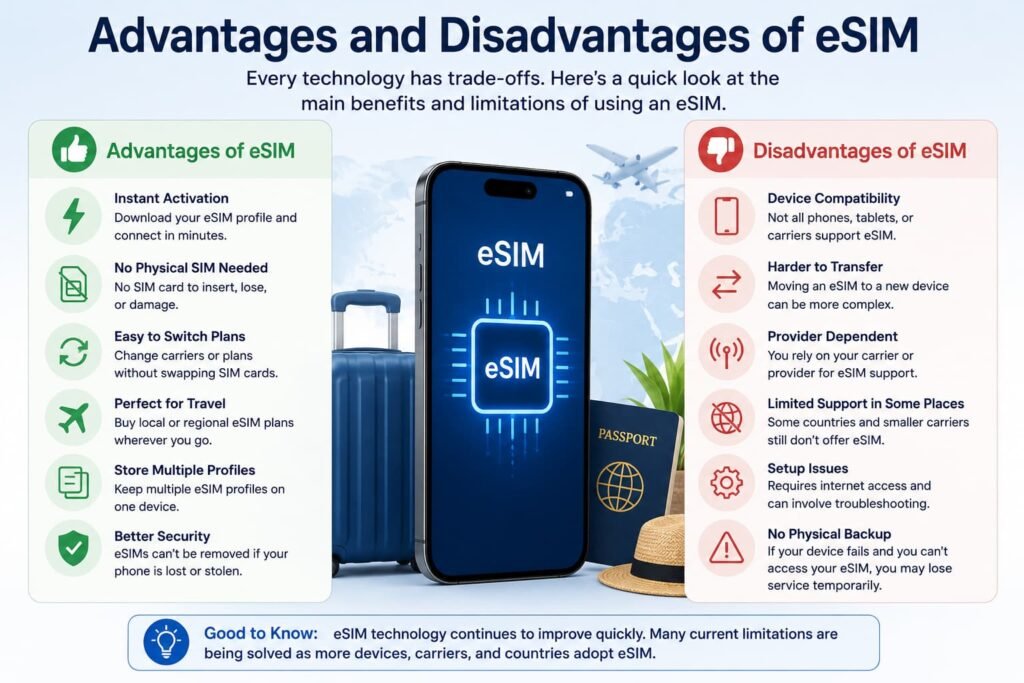
Advantages and Disadvantages of eSIM
eSIM has some clear advantages, but a physical SIM can still be easier in certain situations, especially when you regularly move service between phones.
Advantages of eSIM
No small plastic card to handle
There is no nano-SIM to remove, lose or accidentally damage.
Digital activation
Many carriers and travel providers can deliver an eSIM without mailing a physical card or requiring you to visit a store.
Useful for multiple lines
Compatible phones can store more than one profile, making it easier to manage personal, work and travel subscriptions.
Convenient for travel
You can often install a travel profile before leaving Canada and switch your data line after arrival.
A physical SIM cannot simply be removed from the phone
Someone who has your device cannot eject the eSIM the way they could remove a physical SIM card. That does not make the entire mobile account immune to fraud, but it removes one physical method of taking the SIM from the device.
Disadvantages of eSIM
Not every device supports it
Compatibility can vary by exact model, purchase region, carrier and software.
Moving between phones can require an extra step
With a physical SIM, changing phones can sometimes be as simple as moving the card. An eSIM may need a supported transfer process, a fresh QR code, carrier approval or a replacement profile.
Deleting a profile can create unnecessary problems
Some eSIM QR codes are intended for one-time use. Removing a working profile before confirming the provider’s reinstall process can leave you needing a replacement.
Setup methods vary
One provider may use a QR code while another uses an app, automatic carrier activation or a built-in phone transfer process.
For someone using eSIM for the first time, that variation can make the process look more complicated than it really is.
Does eSIM Change Your Signal, Speed or Coverage?
Switching from a physical SIM to an eSIM does not inherently give your phone better cellular coverage or faster data.
The SIM format is primarily how your subscription is provisioned and identified.
Actual mobile performance depends on factors such as:
- the carrier and local network;
- which network technologies your plan can access;
- your phone and supported frequency bands;
- 4G or 5G availability;
- network congestion;
- your location and signal conditions;
- roaming arrangements for travel plans;
- any plan-level speed or fair-use restrictions.
If the same carrier moves the same mobile plan from a physical SIM to an eSIM, you should not expect the eSIM itself to suddenly make the network faster.
There can still be differences between two eSIM plans because the plans may use different carriers, roaming partners or service rules. That is a difference between the services, not between plastic and embedded SIM technology.
How Do You Know If Your Phone Supports eSIM?
Do not rely only on the phone’s marketing name.
Two phones with similar names can have different hardware or regional configurations.
The safest approach is to check the exact model.
You can use the free eSIM Compatibility Checker to check iPhone, Samsung Galaxy, Google Pixel, Motorola and other supported devices, including regional variations that can affect eSIM support.
You can also look in your phone’s settings.
On many current devices, the relevant option appears somewhere around:
- iPhone: Settings > Cellular > Add eSIM
- Samsung Galaxy: Settings > Connections > SIM manager > Add eSIM
- Google Pixel: Settings > Network & internet > SIMs > Add SIM > Set up an eSIM
Menu wording can change with the device and software version, so the absence of one exact label does not automatically mean the phone lacks eSIM.
Another useful identifier is the EID, which is associated with the device’s eSIM hardware. Finding an EID can be a useful compatibility clue, although you should still confirm that your carrier or eSIM provider supports the device.
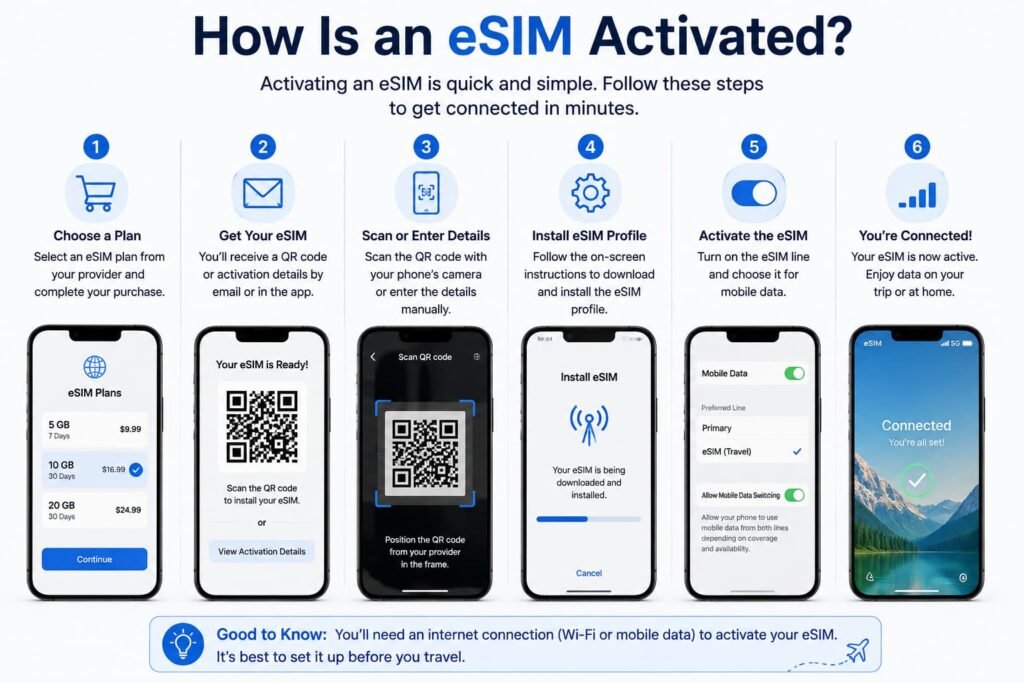
How Is an eSIM Activated?
There is no single universal eSIM activation method.
The basic process normally looks like this:
- Confirm that the phone supports eSIM and is eligible for the service you want.
- Purchase or activate a mobile plan through your carrier or eSIM provider.
- Receive the eSIM profile through a supported activation method.
- Download the profile to the phone.
- Follow the device prompts and choose how the new line should be used.
- Confirm that the line has connected before removing or deleting an existing SIM you still need.
A QR code is common, especially with travel eSIMs, but it is only one option.
Depending on the phone and provider, activation may also happen through automatic carrier provisioning, a carrier app, a web link, a direct phone-to-phone transfer or manual activation details.
Apple’s official eSIM setup guidance documents several iPhone activation methods. Samsung Canada likewise supports multiple setup methods rather than treating QR codes as the only option.
eSIM on iPhone, Samsung Galaxy and Google Pixel
The underlying technology is similar, but the menus are not.
iPhone
On compatible iPhones, eSIM management is found under the Cellular settings. Apple supports several activation methods depending on the carrier, device and situation.
For the complete Canadian walkthrough, see How to Activate eSIM on iPhone in Canada.
Samsung Galaxy
Compatible Samsung Galaxy devices generally manage eSIMs through SIM manager.
Samsung Canada’s eSIM support information also notes that available eSIM features can depend on the device, software and carrier.
For detailed setup steps, see How to Activate eSIM on Samsung Galaxy in Canada.
Google Pixel
Compatible Pixel phones use Google’s SIM settings, with the eSIM setup option normally found under Network & internet.
Google’s Pixel eSIM instructions cover the current setup process.
You can also use our Google Pixel eSIM activation guide or the broader Android eSIM setup guide if you use another Android phone.
Frequently Asked Questions About eSIMs
How does Dual SIM work with an eSIM and a physical SIM?
Dual SIM lets a compatible phone keep two mobile lines available at the same time. Depending on the device, that can mean one physical SIM plus one eSIM or two active eSIMs. You can normally choose which line handles mobile data and which number you use for calls or messages. On supported iPhones, Apple specifically supports both physical SIM + eSIM and Dual eSIM configurations.
For a Canadian travelling abroad, a common setup is to keep the Canadian line available for your regular number, calls, texts or verification codes while using a travel eSIM for mobile data. The exact capabilities depend on the phone, carrier and plan, and using two different carriers may require an unlocked device. Keeping the Canadian line turned on can also expose you to roaming charges if it is used in a way that triggers your carrier’s roaming policy.
Do travel eSIMs come with a phone number, or are they data-only?
Travel eSIMs can be either data-only or include a phone number and conventional mobile service. The eSIM technology does not decide that. The mobile plan attached to the eSIM profile determines whether you receive only data or also get calls, SMS and a phone number.
Apple distinguishes between prepaid data eSIMs sold by worldwide service providers and plans from local mobile carriers, many of which can include a local phone number. That is why you should check the exact plan rather than assuming every travel eSIM is data-only or that every one provides calling and texting.
What happens to WhatsApp and iMessage when you switch to an eSIM?
Moving the same phone number from a physical SIM to an eSIM does not by itself mean you need a new WhatsApp account. WhatsApp is registered to a phone number rather than to whether that number is stored on a physical SIM or an eSIM. If you move to a genuinely different phone number,
WhatsApp provides a Change Number feature for transferring the account to the new number.
On iPhone, iMessage can work with the phone numbers associated with your active lines, and Apple lets you choose which number to use for conversations when Dual SIM is configured. When travelling, Apple also confirms that iMessage and FaceTime can continue using your home line while a travel eSIM handles data. If you change numbers rather than simply changing SIM format, check Messages > Send & Receive to make sure the number you want is selected.
How can I check if my phone supports eSIM and is unlocked?
Start by checking the exact phone model rather than relying only on a name such as “iPhone” or “Galaxy.” Regional versions can differ, and eSIM support can depend on the model, software and carrier. The eSIM Compatibility Checker is the easiest place to verify whether a specific device supports eSIM before buying a plan.
Unlock status is a separate question. On an iPhone, go to Settings > General > About and look beside Carrier Lock. Apple says No SIM Restrictions means the iPhone is unlocked. Android phones do not all provide one identical lock-status menu, so if you are unsure, confirm with the carrier that supplied the phone before trying to use an eSIM from another carrier or travel provider.
What happens if I delete my eSIM profile?
Deleting an eSIM profile removes that mobile profile from the phone, but it does not necessarily cancel the mobile plan or account behind it. Those are separate things. Samsung, for example, notes that removing an eSIM plan from a Galaxy device does not terminate the contract with the network provider.
Getting the profile back depends on the provider and device. Apple advises users not to erase an eSIM as a troubleshooting step unless their carrier tells them to, and says a deleted iPhone eSIM may require the carrier to provide a new one. Other providers may support reinstallation, app-based recovery or another activation process. Before deleting a working travel eSIM or carrier line, check the provider’s reinstall or transfer rules first.
How many eSIM profiles can you store on one phone?
There is no single storage limit that applies to every eSIM-compatible phone. The number of profiles a device can store is also different from the number of lines it can keep active at the same time.
Apple currently says supported iPhones can store eight or more eSIMs, while supported models can have two eSIMs active simultaneously. Samsung also makes clear that Galaxy storage capacity depends on the device and the size of the downloaded profiles, so you should check your exact model rather than applying one fixed number to every phone
How do I transfer an eSIM to a new phone?
The transfer method depends on the old phone, new phone and carrier. Some combinations support direct device-to-device transfer. Apple, Google and Samsung all currently document eSIM transfer methods on supported devices, so moving an eSIM does not automatically mean obtaining a new QR code or activation token.
Other carriers or travel-eSIM providers may require you to install a replacement profile or complete the move through their app or account. Do not delete the working profile from your old phone until you know which process your provider supports. For the full Canadian walkthrough, see our guide to transferring an eSIM between phones in Canada.
Is eSIM safer than a physical SIM card?
An eSIM has one practical security advantage: there is no removable SIM card that someone can simply eject from a stolen phone. Apple specifically identifies this as a security benefit because the eSIM cannot be physically removed in the same way as a plastic SIM.
That does not make eSIM immune to SIM-swap fraud, account takeovers, phishing or other attacks involving your carrier account. Device security, your carrier PIN or password and other account protections still matter. It is more accurate to say eSIM removes some physical SIM-card risks rather than treating it as a complete security solution or assuming it makes a lost phone continuously trackable.
Related eSIM Canada Guides
Understand and Check Your Device
- eSIM Canada: Complete Guide for Travellers and Locals
- eSIM Compatibility Checker
- Compare Canadian eSIM Providers
Set Up Your eSIM
- How to Activate eSIM on iPhone in Canada
- Activate eSIM on Android Canada
- How to Activate eSIM on Samsung Galaxy in Canada
- How to Activate eSIM on Google Pixel in Canada
- How to Transfer eSIM Between Phones in Canada
Using eSIM for Travel
Final Thoughts
The easiest way to understand eSIM is to separate the technology from the mobile plan.
The eSIM is built into your phone. An eSIM profile is downloaded to it. The mobile plan attached to that profile determines what network, phone number, calls, texts and data you actually receive.
Once you understand those three pieces, eSIM becomes much less complicated.
For Canadians, the same technology can run your normal mobile line, add a second number, or let you install travel data before leaving the country. It can also make Dual SIM setups much more practical because you are no longer limited to physically swapping cards every time you want to use another mobile subscription.
The technology is different from a traditional SIM card. What your phone does once it connects to the mobile network is much more familiar.