Travel eSIM Data Calculator
Estimate how much mobile data you may need for your trip before choosing a travel eSIM. Select a usage profile or enter your own daily habits, then the calculator adds a 20% planning buffer to suggest a practical data allowance.
Your Daily Data Habits
Adjust the activities you expect to use on mobile data. Wi-Fi use does not need to be included.
Estimated Data Breakdown
This calculator is a planning estimate, not a guarantee of how much data you will use. Actual usage varies by app settings, streaming quality, background activity, network conditions and device behaviour.
How the estimate is calculated
The calculator estimates each activity separately, applies those daily usage estimates across your trip length, and then adds a 20% planning buffer. Social and web use changes according to the browsing style you select, while video streaming changes with quality. Video calls use a representative 10 MB-per-minute planning rate. Your actual usage may differ depending on the apps you use, background syncing, streaming settings and network conditions. Downloading maps, playlists and video over Wi-Fi before leaving Canada can help reduce the amount of travel eSIM data you need.
Last updated: September 17 2026
How Much eSIM Data Do You Need for Travel?
Start with your actual mobile-data habits rather than assuming every one-week trip needs 5 GB or every two-week trip needs 10 GB. Maps, messaging and light browsing usually have a modest effect on the total, while streaming video, video-heavy social feeds, long video calls and hotspot use can increase it quickly.
The calculator estimates your trip from the activities you enter, adds a 20% buffer for heavier-than-expected days and background activity, then rounds the result to a common travel eSIM allowance. Treat that number as a planning target rather than a guarantee because app settings, Wi-Fi use, streaming quality and background syncing can all change real consumption.
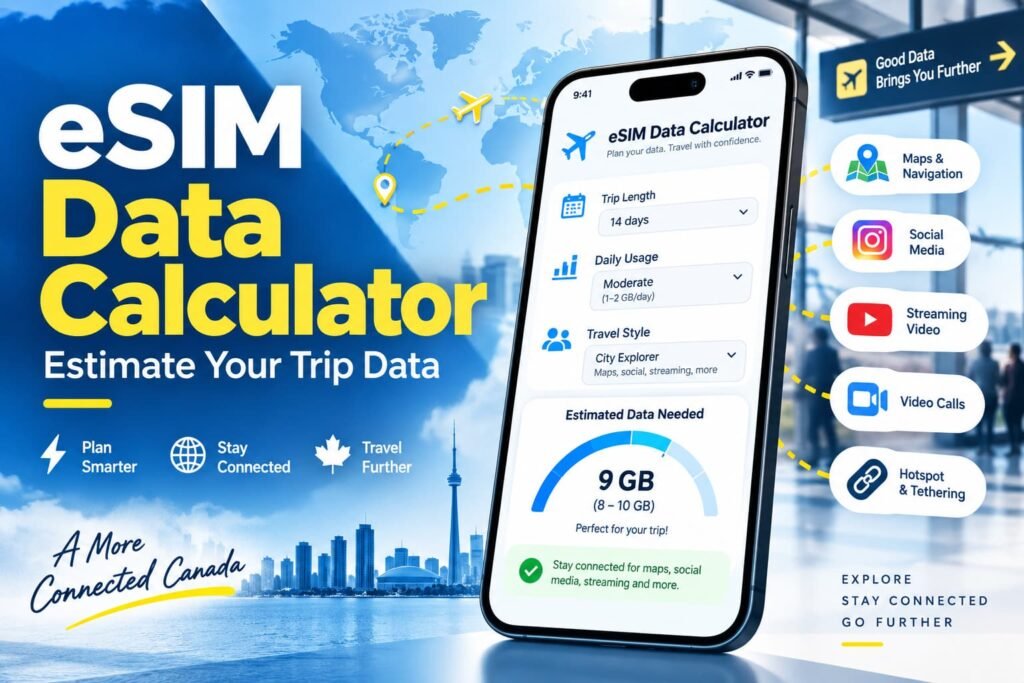
How to Use the Travel eSIM Data Calculator
The quickest way to get started is to choose one of the usage profiles, then adjust anything that does not match the way you travel. You can also build the estimate manually from the beginning.
1. Enter Your Trip Length
Start with the number of days you expect to need mobile data. The calculator accepts trips from 1 to 180 days and starts at seven days by default.
Include arrival and departure days if you expect to use your phone for airport transport, maps, bookings or messages. Daily data use that looks small over a weekend can add up quickly over two or three weeks.
2. Choose a Starting Usage Profile
The calculator gives you four options:
- Light use
- Everyday use
- Heavy use
- Custom
No profile is selected automatically.
Choosing Light, Everyday or Heavy loads a representative set of daily habits. These profiles are starting points rather than assumptions about how every traveller behaves.
Light use focuses mainly on navigation, messages, some browsing and modest background activity. Everyday use adds more social media, music, a little video and short video calls. Heavy use assumes much more video-heavy social browsing, HD streaming, calls, background syncing and laptop hotspot use.
If you change any of the individual fields after selecting a preset, the calculator switches the profile to Custom so the result reflects your actual settings.
3. Adjust Your Daily Data Habits
Think only about activities you expect to use on mobile data. Anything you plan to do exclusively on hotel, airport or café Wi-Fi does not need to be included.
The calculator covers:
- maps and navigation
- messaging and email
- web browsing and social media
- music streaming
- video streaming
- video calls
- hotspot or laptop use
- background apps and updates
A traveller who downloads movies over hotel Wi-Fi will have very different needs from someone streaming them over cellular data on a five-hour train ride.
The same applies to cloud backups, app updates and laptop use. Those activities can continue consuming data even when your phone is not the main screen you are looking at.
4. Choose the Social Media Style That Matches How You Scroll
Social media is difficult to estimate with one number because reading posts and looking at photos is very different from watching a continuous stream of short-form video.
For social-media planning, the calculator separates usage into three levels:
- Mostly web, text and photos: approximately 1.5 MB per minute
- Mixed social use: approximately 3 MB per minute
- Video-heavy feeds, Reels or TikTok: approximately 8 MB per minute
These are planning estimates rather than fixed app limits. Autoplay, video resolution, preloading and the specific service can move real usage higher or lower.
If Instagram Reels, TikTok or YouTube Shorts are part of your normal travel day, the video-heavy option will usually give you a more realistic estimate than treating all social-media use as ordinary web browsing.
5. Review Your Suggested Travel eSIM Allowance
Once you calculate the trip, the results show:
- estimated trip usage before the buffer
- usage after the 20% buffer
- a suggested travel eSIM allowance
- an activity-by-activity data breakdown
- a personalised tip based on your biggest data category
The suggested plan sizes move through common allowances including 1 GB, 3 GB, 5 GB, 10 GB, 20 GB, 30 GB, 50 GB and 100 GB. Higher estimates are shown as 100 GB+ / Unlimited.
The calculator rounds upward because real eSIM plans normally come in fixed sizes. If your buffered estimate is 6 GB, a 5 GB plan would already sit below the planning target, so the next practical tier is more useful to investigate.
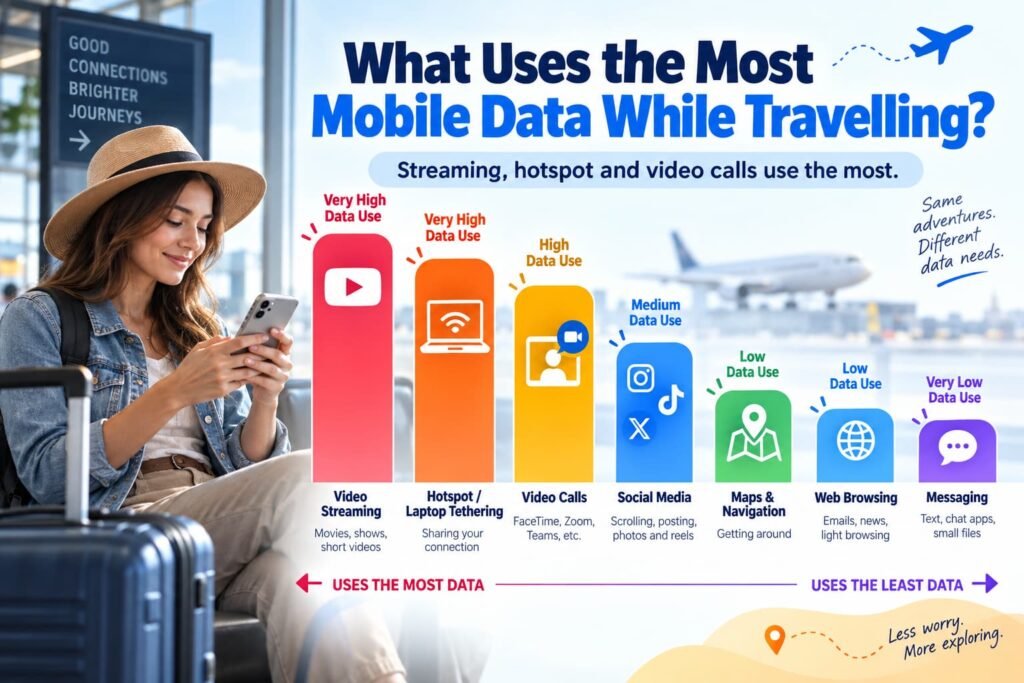
What Uses the Most Mobile Data While Travelling?
Video tends to change a travel-data estimate faster than anything else.
Streaming a show, watching short-form videos for an hour, sitting through a long video meeting or tethering a laptop can consume much more data than checking a map or sending ordinary messages. Cloud photo and video uploads can also become a large hidden category when cellular backup is enabled.
That is why trip length alone is a poor way to choose an allowance.
Two travellers can spend seven days in the same country and need completely different plans. One may use hotel Wi-Fi for streaming and rely on cellular data only for directions, transport apps and messages. The other may spend several hours a day watching video and working from a laptop.
After running the calculator, look at the Estimated Data Breakdown rather than only the final number. The largest category is usually where changing one habit has the biggest effect on the allowance you need.
How Much Data Does Social Media Use While Travelling?
There is no single useful rate for all social media.
Text posts, messages and still photos sit at the lighter end. Reels, TikTok, Shorts and other autoplay-heavy feeds can consume substantially more because video keeps loading as you scroll.
That is why I would not plan a trip around a claim such as “Instagram always uses X MB per hour.” The result changes according to what you watch, how long videos play, their quality and how aggressively the app preloads content.
For planning purposes, use the calculator’s lighter social setting when you mainly read posts, check photos and send messages. Choose mixed social use when your feed contains a regular combination of photos and video. Use the video-heavy setting when short-form video makes up a significant part of your scrolling.
How Much Data Does Video Streaming Use?
Streaming quality can change the result dramatically.
Netflix currently publishes figures of up to about 0.3 GB per hour on Low, 0.7 GB per hour on Medium, and approximately 3 GB per hour for HD video on its higher data setting. 4K video can use considerably more. Netflix data-usage settings
The calculator uses planning rates that closely reflect those first three levels:
| Video setting | Calculator rate | Approximate hourly use |
|---|---|---|
| Low / Data Saver | 5 MB/min | 300 MB/hour |
| Standard | 11.67 MB/min | About 700 MB/hour |
| HD | 50 MB/min | 3 GB/hour |
That difference becomes significant over a longer trip.
Watching one hour of HD video every day can use up to about 21 GB over a seven-day trip before accounting for anything else. Watching the same shows after downloading them over Wi-Fi uses none of your travel eSIM data while they play offline.
If you know you will spend long flights, train journeys or evenings watching video, downloading it in advance can make a larger difference than trying to save a few megabytes on maps or messaging.
Music Streaming: What Changes Your Data Estimate?
Music usually consumes much less data than video, but several hours every day still add up during a long trip.
The calculator uses 1.2 MB per minute, or around 72 MB per hour, as its music-streaming planning rate.
Spotify publishes different bitrates depending on the quality setting. Its current options range from roughly 24 kbps on Low through 96 kbps on Normal and 160 kbps on High, with higher settings available on supported plans and devices. Spotify audio-quality settings
Your actual usage can therefore land above or below the calculator’s planning figure.
For long road trips, train rides or sightseeing days, download playlists and podcasts while connected to Wi-Fi. You can still listen normally without repeatedly using your eSIM allowance.
Maps and Navigation: How Much Data Do They Use?
Maps are one of the most useful travel apps, but they normally have a much smaller effect on your allowance than sustained video use.
For navigation, the calculator uses a relatively light planning rate. Its navigation rate is a planning assumption rather than an official Google Maps data-usage figure because actual consumption changes with new map areas, searches, live traffic, satellite imagery, rerouting and other features.
Google Maps also supports downloading areas for offline use. When the complete route is contained inside a downloaded map, offline driving navigation can continue without a live data connection. Google Maps offline-map guidance
There are limitations. Live traffic and alternate-route information require connectivity, and offline support for transit, cycling and walking directions is more limited.
Before a road trip or a day where reception may be unreliable, download the relevant area over Wi-Fi. It reduces mobile-data use and gives you a useful backup when the underlying network disappears altogether.
How Much Data Do Video Calls Use?
There is no universal rate for FaceTime, WhatsApp, Zoom, Teams or other video-calling apps.
Resolution, group size, screen sharing, network conditions and the app’s own quality adjustments all affect the amount transferred.
For video calls, the calculator uses 10 MB per minute, or approximately 600 MB per hour, as a representative planning rate.
That is deliberately presented as an estimate rather than a claim that every video call uses exactly that amount. Zoom’s published bandwidth requirements, for example, change substantially between ordinary video, HD calls and different group-meeting conditions. Zoom bandwidth requirements
A few short calls home may have little effect on a larger allowance. Daily work meetings are different.
If you expect to spend an hour or more in meetings on several travel days, enter that time realistically. Using dependable Wi-Fi for longer calls can reduce the mobile-data requirement considerably.
Does Hotspot Use Change How Much eSIM Data I Need?
Hotspot use can change the answer very quickly.
Once a laptop or tablet connects through your phone, your travel eSIM is no longer serving only mobile apps. Desktop websites, cloud storage, operating-system updates, video meetings, file transfers and software downloads can all use the same data allowance.
Hotspot and laptop activity therefore get their own category in the calculator.
A light tethering session might involve checking email and doing basic web work. Remote work with cloud files, video conferencing and large downloads can consume several times more.
Before buying an eSIM for remote work, also check the specific plan’s hotspot or tethering rules. Some unlimited-style products still apply separate hotspot allowances, high-speed limits or other restrictions.
Why the Calculator Adds a 20% Data Buffer
Travel rarely follows the exact schedule you planned before leaving Canada.
A train cancellation might leave you navigating longer than expected. Poor hotel Wi-Fi might push a video call onto cellular data. Photos may start syncing in the background, or you may spend more time using social media during a long travel day.
A 20% buffer is therefore added to the estimated trip usage before the calculator selects the suggested plan size.
The buffer is meant to create some breathing room. It does not guarantee that the allowance will last for the entire trip.
Someone whose habits stay consistent and who uses Wi-Fi heavily may finish with plenty of data left. Someone who starts streaming HD video, enables cloud backups or uses a laptop hotspot for several hours can exceed the estimate.
Should You Buy 5 GB, 10 GB, 20 GB or Unlimited Data?
The useful answer comes from what the calculator says about your trip, not from declaring one plan size ideal for everyone.
Smaller eSIM Plans
A smaller allowance can work well when the trip is short and most heavy activity stays on Wi-Fi.
If cellular data is mainly for maps, messages, ride-hailing, transit apps, email and quick searches, you may not need a large package simply for peace of mind.
That can make more sense than paying for 20 GB and leaving most of it unused.
5 GB and 10 GB Plans
Mid-range allowances become more relevant when you add regular social-media use, browsing, music and occasional video.
Duration still matters.
A set of habits that fits comfortably into 5 GB during a four-day city trip can exceed the same allowance over two weeks. A 10 GB package gives you more room, but it is still possible to burn through it quickly with frequent streaming or video calls.
20 GB, 30 GB and Larger Plans
Look at larger fixed-data plans when your trip is long or when video, remote work, cloud uploads and hotspot use are regular parts of the itinerary.
Your calculated result will move into those larger tiers when the buffered estimate justifies it.
That is more useful than buying a very large plan automatically because the trip lasts two weeks.
Important Note:
“Unlimited” is not a standardized travel eSIM feature. Depending on the provider and plan, there may still be high-speed data limits, fair-use rules, speed reductions or separate hotspot restrictions.
Estimate your likely usage first. You can then compare a large fixed-data plan with an unlimited-style option and decide which terms fit the trip better.
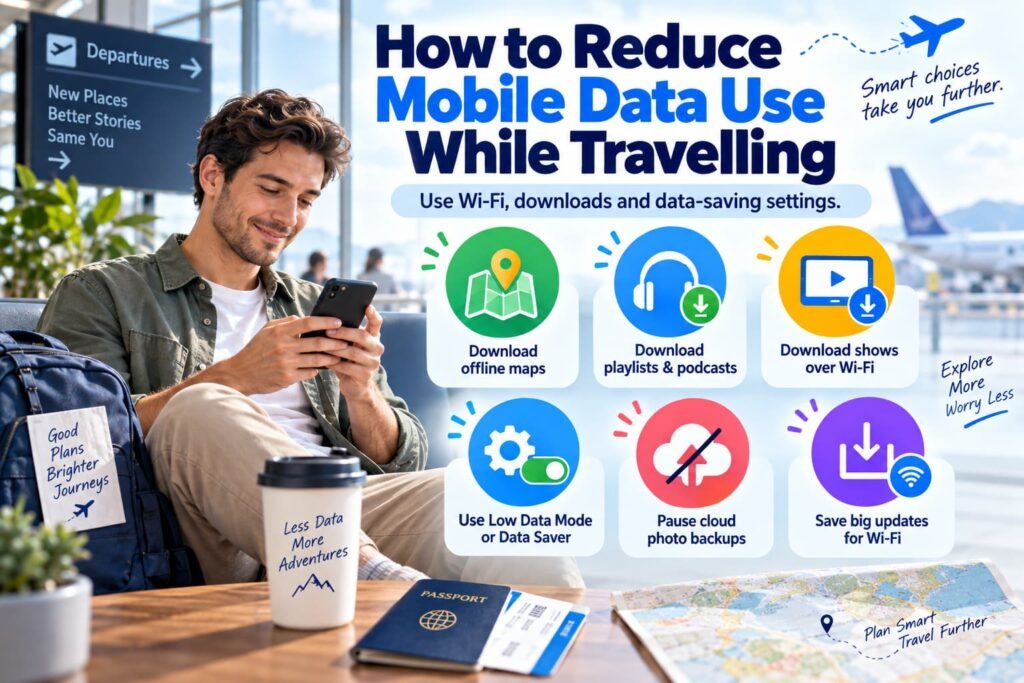
How to Reduce Mobile Data Use While Travelling
Reducing an eSIM estimate does not necessarily mean using your phone less. Moving the right activities onto Wi-Fi can make a much larger difference.
Download Google Maps areas before longer travel days. Save playlists and podcasts offline. Download movies or shows before leaving reliable Wi-Fi.
Large app updates, phone backups and operating-system downloads are also better left for Wi-Fi.
On an iPhone, Low Data Mode reduces cellular activity by limiting automatic updates and some background tasks. Apple Low Data Mode guidance Supported Android devices provide Data Saver, which restricts background mobile-data access for many apps unless you specifically allow them. Google Data Saver guidance
Cloud photo syncing deserves particular attention while travelling. A day of shooting high-resolution photos and video can create a sizeable upload if the phone is allowed to back everything up over cellular data.
Streaming quality is another easy adjustment. Dropping from HD to Standard can cut video consumption dramatically without requiring you to stop watching altogether.
What to Do After You Know How Much Data You Need
Estimating your allowance solves the first part of the buying decision. The next step is choosing the right way to get that data.
Compare Travel eSIM Plans in CAD
Once you have a target such as 5 GB, 10 GB or 20 GB, use the eSIM Plan Comparison Tool to compare travel eSIM options for the destination.
The calculator on this page answers how much data you may need. The comparison tool answers which available plans fit that requirement, along with other trip considerations such as hotspot support and pricing in Canadian dollars.
Compare a Travel eSIM With Canadian Carrier Roaming
If you are still deciding whether buying a travel eSIM makes sense at all, use the Canadian Roaming Savings Calculator.
It is designed for a different question: comparing the estimated cost of using a travel eSIM with keeping your Canadian carrier’s roaming option for the trip.
That decision becomes easier once you already have a realistic idea of how much data you expect to use.
Check Whether Your Phone Supports eSIM
Before buying a plan, confirm that the phone, tablet or smartwatch can actually install and use an eSIM.
The eSIM Compatibility Checker is the better tool for that job because eSIM support can vary by model, market and device version.
Frequently Asked Questions About Travel eSIM Data
How much data do I need for a 7-day trip?
A seven-day trip can require anything from a small data plan to tens of gigabytes because the deciding factor is how you use the phone during those seven days. Maps, ordinary messages, email and occasional browsing consume far less than daily HD video, video-heavy social feeds or laptop hotspot use.
Enter seven days in the calculator and adjust each activity to match what you expect to do away from Wi-Fi. The calculator then adds its 20% planning buffer before suggesting an allowance, which gives you a much better starting point than assuming every one-week holiday needs the same amount of data.
Is 5 GB enough for a week of travel?
Five gigabytes can be plenty for a week when cellular data is concentrated on navigation, transport apps, messaging, email, browsing and moderate social-media use. Using accommodation Wi-Fi for video, app updates and large photo uploads makes a 5 GB allowance much easier to manage.
It becomes much easier to exhaust 5 GB when HD streaming, TikTok or Reels, long video calls, cloud backups or laptop tethering are part of the trip. Rather than treating 5 GB as automatically enough or not enough, enter those habits into the calculator and check whether the buffered estimate remains below that threshold.
What about 10 GB for a two-week trip?
Ten gigabytes spread across 14 days works out to roughly 714 MB per day. That can be comfortable for some moderate travellers, particularly when heavy streaming and downloads happen on Wi-Fi.
Daily video meetings, frequent short-form video or hotspot use can push a two-week estimate much higher. Trip duration and activity type need to be considered together, which is why the calculator multiplies your expected daily use by the full trip length instead of assigning one standard amount to every two-week holiday.
Does an eSIM use more data than a physical SIM?
Using an eSIM instead of a physical SIM does not inherently make an app consume more mobile data. Streaming the same video, loading the same webpage or using the same navigation app transfers data based on the activity and app settings rather than whether the mobile plan is stored on a physical SIM card or an eSIM.
Real-world totals can still differ between trips because network conditions, streaming quality, background settings and which line is selected for cellular data may change. The eSIM itself is not what makes an identical activity use substantially more data.
How can I check how much mobile data I normally use before a trip?
Your phone’s cellular-data settings can give you a useful reference for how much data you already consume and which apps use the most. On iPhone, look in the Cellular or Mobile Service settings. Android menu names vary by manufacturer, but mobile-data usage is normally found under Network & internet, Connections or SIM settings.
The number is most useful when you consider the period it covers. A monthly total from normal life at home may include activities you usually perform on cellular data but plan to move to hotel Wi-Fi while travelling, so use it as a baseline rather than copying the figure directly into your trip estimate.
Do background apps and cloud backups use my travel eSIM data?
Background apps can use travel eSIM data when they are allowed to access the cellular connection. Cloud photo uploads, email syncing, automatic app activity and other background processes can continue even when you are not actively using those apps.
That is why the calculator includes a separate background-apps category. Before travelling, review cloud photo backups, automatic downloads and background-data settings if you are trying to stay within a smaller allowance. Low Data Mode on iPhone or Data Saver on supported Android devices can also reduce some background activity.
What happens if I run out of eSIM data while travelling?
What happens at the end of an allowance depends on the provider and plan. A capped travel eSIM may stop providing mobile data until you buy a top-up or another plan, while some products allow renewal through the provider’s app or account. Certain plans may instead reduce speed after a stated high-speed allowance.
Do not assume every eSIM can be topped up in the same way. If your calculator estimate sits close to a plan’s data limit, check the provider’s top-up, renewal or speed-reduction rules before buying so you know what your options are if the trip uses more data than expected.
Can hotel Wi-Fi reduce how much eSIM data I need?
Dependable Wi-Fi can materially reduce the amount of travel data you need when it handles the activities that consume the most. Streaming, cloud backups, large downloads, software updates and long video calls are good candidates to move off your eSIM allowance.
Do not subtract the activities that still need to work when you leave the hotel. Navigation, transport apps, restaurant searches, translation, bookings and messaging often matter most while you are away from Wi-Fi, which is exactly when your travel eSIM becomes useful.
Related eSIM Guides
Planning Your Trip
eSIM Setup and Troubleshooting
- Travel eSIM Not Working Abroad?
- eSIM Troubleshooting
- eSIM Connected but No Internet?
- eSIM QR Code Won’t Scan?
Final Thoughts
I would size the plan around what you expect to do away from Wi-Fi, not around how much data happens to be included with your normal Canadian phone plan.
Maps, messages and quick travel searches usually worry me much less than video, autoplay social feeds, cloud uploads or a laptop hotspot. Those are the activities that can turn what looked like a comfortable 5 GB or 10 GB allowance into something much tighter.
My approach is to enter realistic daily habits, keep the 20% buffer as a little breathing room, and pay attention to whichever activity is driving most of the estimate. Once you know roughly how much data you are likely to use, it becomes much easier to compare travel eSIM plans without paying for far more data than you need or running short halfway through the trip.